Overview
PTC's Landed Cost framework enables postal operators to transmit requisite shipment data directly via the Customs Declaration System (CDS) to BoxC.
Through direct integration with this framework, BoxC processes the transmitted data to perform U.S. duty calculations and execute remittance to U.S. Customs and Border Protection (CBP) under our Qualified Party authorization. This approach allows Posts to satisfy U.S. duty prepayment requirements using their existing postal infrastructure, without the need to build separate customs calculation or payment systems.
For operators already utilizing PTC messaging standards, activation of U.S. duty compliance is an extension of current workflows rather than a system overhaul.
Integration
Only certain versions of CDS are supported by the PTC for Landed Cost functionality. You will need to confirm which implementation and version of CDS is running in order to determine whether you will be able to utilize the available tools.
Self Hosted Application
For those self-hosting CDS, Landed Cost is currently supported in versions from 2025 onwards. A patch may be required in order to add BoxC into your integration; this can be requested from your BoxC account representative or by directly reaching out to your PTC contacts.
Hosted and Cloud Application
The Landed Cost module is already natively supported. No further action is required on your part to activate Landed Cost.
Configuration
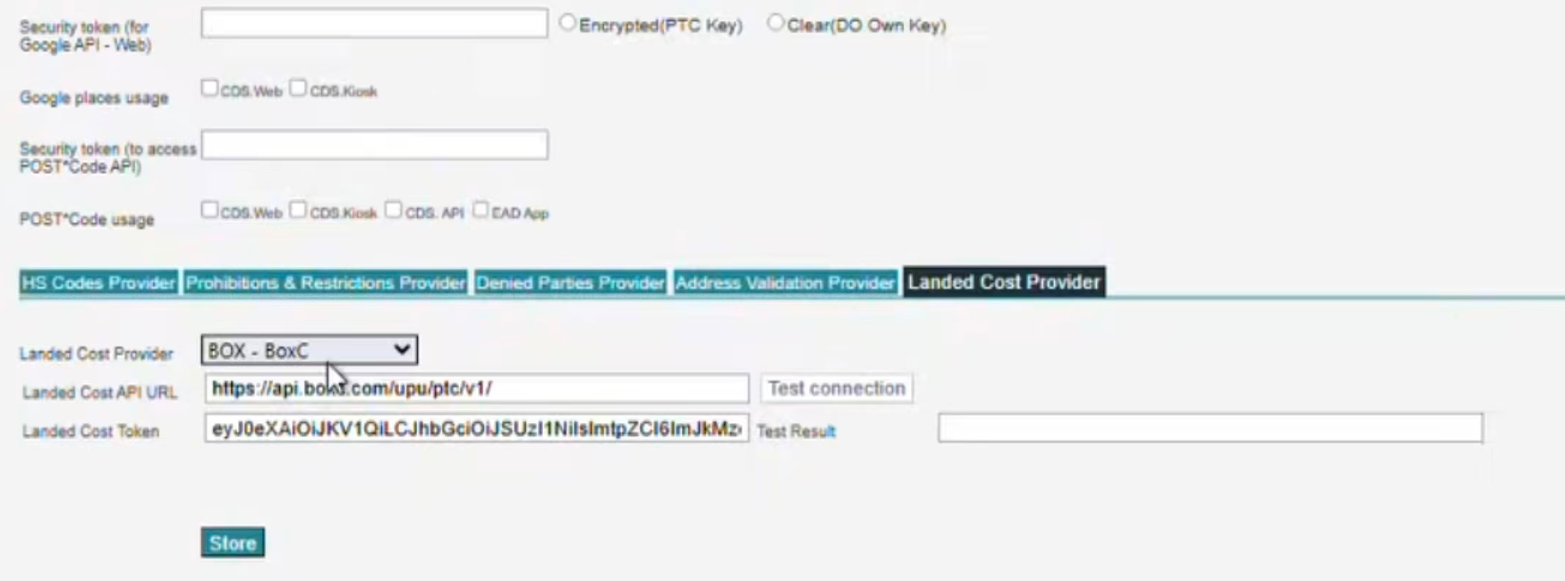
Once logged in to CDS, select Manage organization preferences and navigate to Landed Cost Provider.
Select BOX - BoxC. You will be prompted to enter your Landed Cost Token. The token can be retrieved from within your BoxC account or by contacting your BoxC account representative.
Click on Test connection and if you have received a success message, you have successfully connected your account to the BoxC service.
There are some configuration options that your PTC contacts can discuss with you.